Smart shipping rules: how to automate fulfillment and reduce shipping headaches



TL;DR: Manual shipping slows you down, leads to errors, and makes scaling messy. This guide shows growing e-commerce merchants how to use smart shipping rules to automate fulfilment, reduce costs, and streamline operations—using tools like Sendcloud’s no-code rules builder to turn shipping into a growth driver.
Shipping is a make-or-break moment in e-commerce. But for many growing merchants, it’s still way too manual. Sorting orders, picking the “right” carrier, double-checking packaging, and correcting mistakes before anything even ships.
All that manual sorting doesn’t just eat up your time, it chips away at profits and customer trust. And as your order volume grows, so does the complexity.
The good news? You can automate all of it.
In this guide, we’ll explain what smart shipping rules are, how real merchants use them to streamline their e-commerce shipping, and how Sendcloud’s no-code rules builder helps e-commerce shops ship smarter at scale.
🎧 Busy packing orders? Just press play and listen to the blog instead!
What are shipping rules?
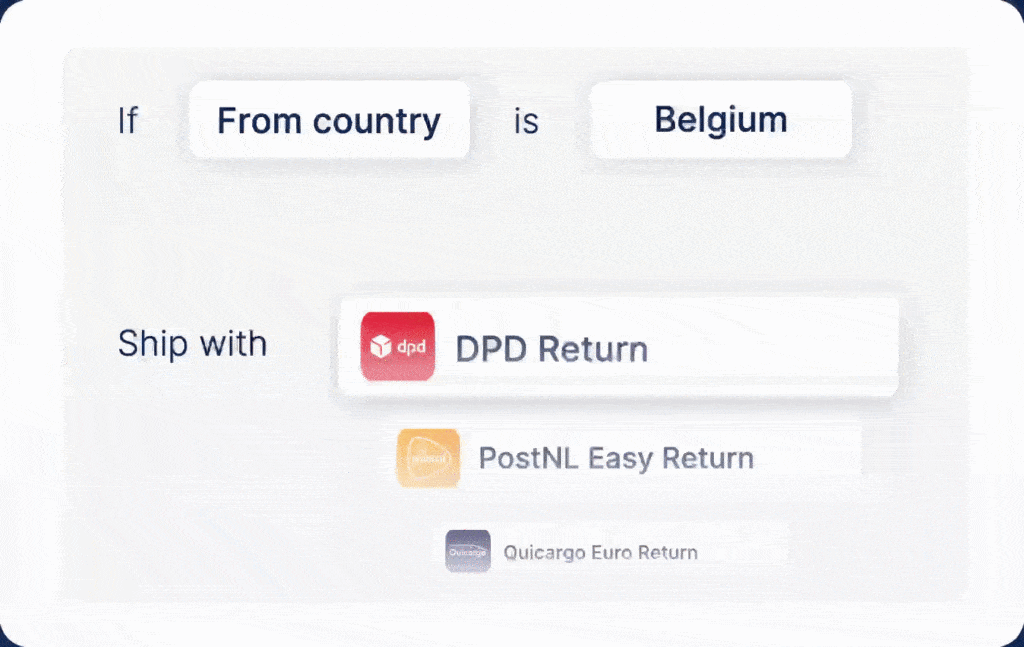
Shipping rules are conditional automations that let you handle fulfillment decisions without lifting a finger. Think of them like “if this, then that” instructions: if an order meets certain conditions, the system will automatically apply the correct shipping method, carrier, packaging, or insurance.
For example:
If order value > 100€ and destination = France, then ship via Chronopost with insurance.
If order tag = “Fragile”, then require signature and apply special packaging.
Once set up, these rules eliminate manual sorting, reduce human error, and bring consistency to every shipment, no matter how complex.
How shipping rules plug into your e-commerce workflow
Shipping rules are typically managed in your shipping automation platform and sync with your e-commerce tools like Shopify, WooCommerce, Magento, and others.
With Sendcloud, for example, rules automatically trigger based on real-time order data (destination, weight, value, tags, etc.), so your shipping decisions happen without you having to think about them.
Anatomy of a shipping rule
Each rule includes:
Condition(s) – the “if” part (e.g., destination, order value, product tag)
Trigger – what activates the rule (e.g., new order received)
Action – what happens (e.g., apply insured shipping, choose carrier, set packaging)
You can combine multiple conditions using AND/OR logic, creating precise automations for even the most complex workflows.
Why smart shipping rules matter
Manual shipping might work when you're just starting out…but as soon as your order volume increases, it becomes one of the biggest bottlenecks in your business. Every time you stop to pick a carrier, check a product tag, or decide if a shipment needs insurance, you’re losing time. And possibly money.
The core pains merchants face with manual shipping
Manual decision-making: Sorting orders by hand, choosing carriers manually, and second-guessing packaging requirements takes time you can’t afford.
Errors and exceptions: Forgotten insurance, wrong shipping method, or untracked high-value orders lead to costly mistakes.
No visibility or control: With multiple carriers, channels, and shipping methods, keeping oversight gets tricky fast.
Scaling challenges: As order volumes rise, human processes struggle to keep up, leading to processes break, staff burn out, and fulfillment lags.
How smart shipping rules solve these problems
Smart shipping rules transform messy, manual decision-making into automated workflows that scale with your business. Here’s what they gain you:
Time back: Automate repetitive tasks like carrier selection, label generation, and packaging choices.
Lower costs: Always pick the cheapest suitable option, apply insurance only when needed, and avoid surprise surcharges.
Fewer errors: Rule-based logic ensures consistency across orders, reducing human error.
Freedom to scale: As volumes grow, your rules do the heavy lifting—so you don’t have to.
Whether you're shipping 100 or 10,000 orders per month, shipping rules give you the control, speed, and flexibility to grow without the chaos!
How shipping rules work
Shipping rules use conditional logic to automate decisions throughout the fulfillment flow. Instead of handling each order one by one, you set logic once and let it run.
Let’s break down the key types of logic you can use:
1. Carrier & rate selection automation
Automatically assign the best carrier based on country, value, service level, or customer segment.
Example rule: If destination = Germany AND order value > 150€, then use DHL Express with insurance.
💡Why it matters:
Ensures timely delivery across regions
Cuts costs by selecting the best available rate
Simplifies international shipping
Le Colonel Moutarde uses shipping rules to switch carriers by country and automate label generation based on parcel type—saving time and preventing errors.
2. Packaging & weight logic
Assign packaging based on item size, weight, or quantity.
Example rule: If total weight > 5kg, use large parcel packaging and select the correct shipping method based on weight class.
💡Why it matters:
Carriers charge different rates based on weight classes (e.g., under 2kg, 2–3kg, 3–4kg, etc.). Selecting the wrong shipping method, even if the parcel is labeled correctly, can result in surcharges (e.g., €2.20 for exceeding the declared weight)
Smart rules automatically apply the correct method and packaging, helping you avoid penalties and keep costs predictable
Ensures efficient use of materials
Speeds up label generation
3. Conditional rules by product or tags
Use tags or product attributes to trigger special actions like requiring a signature or using express services.
Example rule: If order tag = “Fragile”, require a delivery signature and apply insured shipping.
💡Why it matters:
Helps protect goods that need extra handling or security
Improves delivery experience
Reduces claim risk and customer complaints
2,500+ Shopify merchants use Sendcloud’s order tag logic to automate rules for subscriptions, fragile items, or urgent deliveries.
4. Fallback logic & error prevention
Define what happens if the preferred option isn’t available—ensuring orders never get stuck.
Example rule: If DPD Standard is unavailable due to weight, fallback to UPS.
💡Why it matters:
Keeps fulfillment flowing
Reduces manual checks
Prevents failed shipments or delays
With the right mix, your shipping runs on autopilot and adapts as you grow. Ready to see what this looks like in action?

Real merchant use cases: smart shipping rules in action
Shipping rules aren’t just theory, they’re already powering fulfillment workflows for thousands of merchants across Europe. Let’s look at how real businesses are using smart rules to scale without the stress.
1. XXL Nutrition — Reducing errors with multi-collo automation
As a fitness brand shipping bulky, complex orders, XXL Nutrition faced frequent errors and fulfillment slowdowns. With Sendcloud, they built rules to automatically split large orders into multiple parcels (multi-collo) and assign the right carrier per shipment.
Results:
50% fewer label errors
Seamless integration with Magento & BizBloqs WMS
Faster processing with fewer manual checks
“Before Sendcloud, 1 in 10 labels had issues. Now, errors are cut in half.” — XXL Nutrition
2. Le Colonel Moutarde — Automating carrier selection by region
Operating across France and Germany, Le Colonel needed a way to simplify international shipping. They created rules to route orders based on destination—Chronopost for France, DPD for Germany—automating label generation in the process.
Use case logic: If destination = FR, use Chronopost; if destination = DE, use DPD.
Results:
Faster label printing
Fewer delivery errors
One-click carrier switching
“Automated label generation changed our lives!” - Le Colonel Moutarde
3. Jade Roller — Scaling international shipping with peak-season logic
When Jade Roller expanded into 50+ countries, manual carrier selection quickly became unmanageable. They set up rules to assign localized carriers, apply customs documents, and prioritize express delivery during seasonal spikes.
Use case logic: If destination is international AND season = peak, use DHL Express with customs forms.
Results:
7x faster label generation
Efficient cross-border processing
Consistent delivery during peak sales
4. Boots — Reducing WISMO with proactive tracking
To cut down “Where is my order?” tickets, Boots used shipping rules to trigger branded tracking emails based on shipping events and customer tier.
Use case logic: If order is delayed or high-value, send proactive tracking update.
Results:
Fewer support tickets
Improved NPS
Better customer visibility
5. Pittarosso — Automating returns for loyalty tiers
Managing returns across 200+ locations, Pittarosso used rules to differentiate return flows for VIP customers.
Use case logic: If customer = Gold Tier, include prepaid return label; else, use standard policy.
Results:
Streamlined support
Higher repeat purchases
Less manual handling
These examples show how automation isn’t just about speed, it’s about smarter operations, fewer mistakes, and better customer experience. And the best part? All of these merchants built their workflows without writing a single line of code.
Best practices for rule creation
Smart rules = smart results. But like any automation, they work best when designed with intention. Here’s how to build yours like a pro:
1. Start simple
Where are you wasting time? Start with 2-3 rules that solve that:
Automate carrier selection by country, common destinations and remote areas.
Add insurance for high-value orders
Use express shipping for VIP customers
Carriers often treat remote areas differently—even within the same country. For example, you might need special rules for Corsica (France), Waddeneilanden (Netherlands), or the Canary Islands (Spain), depending on service availability.
Once those are running smoothly, layer in more complexity—like packaging logic, fallback rules, or return flows.
Pro tip: Use Sendcloud’s pre-built templates to set up common rules in seconds.
2. Rule order matters
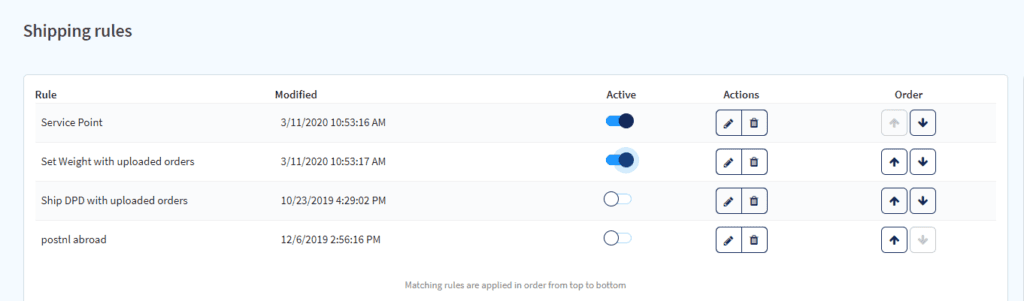
Rules are usually applied from top to bottom, meaning more specific rules should always appear before general ones.
Example:
First rule: If order tag = Fragile, use insured express shipping
Second rule: If destination = France, use Chronopost
In this setup, fragile orders to France still follow the first rule, not get overridden by the second. Think of it like a flow chart: order matters!
3. Test before going live
Before launching a rule live, preview how it will behave on recent orders. This helps catch unexpected matches or missed conditions.
Pro tip: Test rules on sandbox data or low-volume SKUs before scaling across your catalog.
4. Review and update regularly
Use analytics to track how rules impact:
Shipping costs
Error rates
Fulfillment times
Customer feedback (e.g. WISMO tickets)
Update your rules regularly, especially after peak season, changes in carrier performance, or when launching new markets.
5. Think seasonally and strategically
Rules aren’t static. Create variations for peak season, sales events, or product launches.
Examples:
Enable express delivery during holiday periods
Offer free returns on seasonal collections
Auto-prioritize new product launches with fastest carrier
Pro tip: Use bulk editing and duplication to adapt rules quickly without starting from scratch.
When managed well, shipping rules give you full control over fulfillment, without needing to micromanage every shipment.
How Sendcloud’s no-code rules builder works
Sendcloud makes it easy to automate fulfillment logic without technical skills. Here’s how:
1. Drag-and-drop interface
Everything starts with a drag-and-drop builder. Create rules by selecting conditions and actions from dropdowns. No coding or technical setup required.
Rules can be toggled on/off
You can duplicate, delete, or reorder them easily
Pre-built templates help you get started in minutes
Anyone on your team can manage fulfillment logic, no need to involve devs or IT.
2. Powerful, flexible conditions
Rules can be triggered by nearly any order attribute:
Destination country or region
Order value or total weight
Shipping method or chosen carrier
Product SKU, item count, or packaging type
Tags from Shopify, PrestaShop, or others (e.g. “Custom item”, “Urgent”, “VIP”)
Date or time-based triggers (great for campaigns)
Use AND/OR logic to combine multiple conditions for precise automation.
3. Smart actions
When a rule is triggered, Sendcloud can:
Select a specific carrier and service
Apply insurance or request delivery signature
Choose a packaging type
Apply return logic (e.g., prepaid label or not)
Route the order to custom fulfillment flow
4. Fallback logic
If a rule’s primary action can’t be fulfilled (e.g. DPD Standard is unavailable), fallback logic automatically selects the next-best option.
Example fallback: If DPD Standard is unavailable, use DHL Express.
This prevents shipment delays and ensures every order is processed—even if conditions change.
5. Integrated across your shipping flow
The rules builder works seamlessly with all Sendcloud features, including:
Carrier switching
Label generation
Branded tracking
Returns portal
Support Automation
Analytics
It also integrates with 160+ carriers and major platforms like Shopify, Magento, WooCommerce, PrestaShop, and BigCommerce.
6. Built to scale with your business
Use bulk edit to update multiple rules at once
Assign user permissions and view audit trails
Run A/B tests on rules to optimize fulfillment logic
Leverage Shipping Intelligence data to improve performance
Whether you ship 10 or 10,000 parcels a day, Sendcloud’s rules builder fully adapts to your needs.
Sendcloud’s shipping rules go far beyond simple automations, they’re a control center for your entire post-checkout experience.
Shipping rules conclusion
Shipping rules aren’t just a nice-to-have, they’re your ticket to scaling without the stress.
With Sendcloud, you can build smart, flexible logic in minutes. No devs. No guesswork. Just drag, drop, and done.
So whether you’re tackling WISMO, reducing costs, or gearing up for peak season, you don’t have to work harder. Just ship smarter.
Ready to ship smarter with automation? 👉Build your first rules for free in Sendcloud today!
FAQ
What’s the difference between shipping rules and automation tools?
Shipping rules are one part of your automation toolkit. They let you automate specific fulfillment decisions—like choosing a carrier or adding insurance—based on conditions you set. Automation tools cover broader tasks like label creation, tracking, and returns. With Sendcloud, shipping rules work alongside all your other fulfillment automations.
Do I need a developer to set up shipping rules?
Not at all. Sendcloud’s rules builder is completely no-code. You can create, test, and update rules using a drag-and-drop interface—no technical setup needed.
Can I create different rules for each sales channel or marketplace?
Yes. You can tailor rules based on order data, tags, shipping methods, and source platforms. Whether you're selling via Shopify, WooCommerce, or marketplaces, Sendcloud lets you customize rules per workflow.
What happens if a rule fails or doesn’t match an order?
Sendcloud uses smart fallback logic. If a preferred service isn’t available, the system will automatically apply your backup option—so orders never get stuck
How fast can I get started with Sendcloud’s shipping rules?
You can create your first rules in minutes. Start with one of our pre-built templates, preview the impact, and adjust as needed. No training or integration delays.

Former Product Marketing Manager at Sendcloud, Bart helped bridge the gap between shipping technology and the needs of e-commerce merchants. With a background in B2B SaaS, he specialized in translating complex shipping and logistics features into practical insights for online retailers.
How much time can you save on shipping?

Share
Recommended For You

Integrations
Best Shopify apps for e-commerce stores (including shipping & automation tools)
Discover the best Shopify apps by category and learn how to build a scalable app stack without adding complexity.

Shipping Packaging
E-commerce
Shipping label guide: What is a shipping label & how does it work?
Learn what a shipping label is, what information it contains and how shipping labels work in e-commerce | Tips to avoid errors and ship faster

Carriers
E-commerce
How to estimate shipping costs when rates keep changing
Read our practical guide to estimating shipping costs for your online business. Avoid surprises and build shipping budgets that don’t break mid-year.